:::: MENU ::::

{d} TryCatch - a well-integrated software service providing Team offering a plethora of services and products like ERP, CRM and other web and mobile apps.

  • Web Designing

    Our designs are browser independant, easily customizable and suitable for all screen sizes

  • Web Development

    {d} TryCatch transforms your business thoughts into reality

  • Mobile App Development

    Managed Mobile Applications along with server side backbone for Business development

  • SEO and SMM

    {d} TryCatch helps you to create your unique visibility and establish Identity

The TryCatch - Now Customize without Compromise.

Showing posts with label Android. Show all posts

Monday, 26 January 2015

Today photographic instruments are evolving at a great speed. The need for remote shutters has been present since a long time. And the remote controllers for the camera are really expensive, and also they do not offer much productivity and ease of control. Plus you need to carry them every time, and everywhere you take your camera. now just imagine a scenario, where you could remotely control the Android device using your smartphone. Here is a short post, by which you could control your DSLR camera using your android smartphone, including changing each and every setting and also taking the final shot.

how to control DSLR using android


In this post we will be using a app on the Play Store, named as DSLR Controller (BETA). This app has been developed by Chainfire, who is the leading android developer, and working on the Root Access. The SuperSU app was also coded by Chainfire. So the app would be well coded, that is for sure. Now this app lets you control your DSLR camera by making a false interface on your android screen as shown in the image. It also feeds you live footage, so you could also monitor when you need to take the shot, even sitting at a distance from the camera. This app could finds it’s appication in many photographic scenarios like, Long Exposure Shots, taking selfies, taking photos on Bulb Mode, Low Light Photography, making videos, and much more. So if you are looking for a way to control your DSRL Camera using Android Device, this app is for you.

Control DSLR from your Android Device:

So follow the steps below to completely control your DSLR from your Android Device, not only click pictures, but also change every setting on the camera remotely using this method.
  • Install this app from the Google Play Store
  • Now after you have installed this app on your phone, connect your Android Device with the DSLR camera using a USB cable.
  • Launch the app, and you will see an interface, where you could manipulate almost every setting of the camera.And remotely click picture, also the app streams the live feed from the camera, so you could see the setting changes and then when you have your required frame, just click using the android device remotely.

Also for further help, you could see this video by the App developer for further info.


So this was a method by which you could control the DSLR camera using an Android Device. If you face any problems in the midst of the procedure, comment below, and we will try to get back to you soon. Also you could hit the App’s customer support. At the moment the app does not support all the DSLR cameras, so if it does not work with yours, may be the developer would provide the support in the coming time.
So you are here because you probably have had set a Pattern lock on your android device, and somehow you forgot the the pattern. So just rather than getting a whole factory reset of your device, we have a very easy and nice tutorial to get your Phone unlocked while not even loosing a single contact out of your Phone.

Bypass android pattern lock


Pattern lock on an android device provides users a great security which further prevents your smartphone with any accidental taps like theft or misuse. If a user wants to use this security feature on their android device then they have to customize it under the settings option in menu.

It happens that sometimes users forget the pattern of lock of their devices and in panic they start guessing the pattern and finally comes with a problem of locked out. Users and dear users don’t panic so much as to every problem there is a definite solution as well. If you face a locked out then you can bypass the pattern lock.

There is very commonly used method to bypass android pattern lock which you have forgotten but that will for sure make you loose all your data and all your contacts and everything. in other words it will make the phone a device the same as your bought with everything wiped off including all applications. This can be done by going into the recovery mode of any android device. and then select factory reset option. This is not recommended as for 2 reasons, first, It will clear all your data, second, we have a better option left with us !

You don’t know how to bypass the pattern lock. No worries at all. We will help you out and you just need to follow some ADB commands and then you can finally bypass the pattern lock on an android device. Just go through the following guide tutorial very carefully step-by-step so as to bypass the pattern lock.


SOME BASIC STEPS BEFORE YOU BEGIN Unlock & ByPass a Pattern Lock on an Android Device Without Loosing Data
  • The very first and important need is the ADB drivers that must be installed in your PC.
  • Then it is really important that the USB debugging must be enabled before your device being locked.
  • You should be very carefull while installing the drivers of your device. This technique will not work without installing the specific drivers.

Users might feel really annoyed and irritated when they tried the pattern lock several times in panic and unfortunately their android smartphone displayed locked out. Further users cannot access their android smartphone and at last need to bypass the pattern lock.


HOW TO BYPASS THE PATTERN LOCK ON AN ANDROID DEVICE

Just Follow the easy tutorial to Unlock an android’s pattern lock without factory reset after when you have forgotten it. And yes its that easy as it sounds.

  • Users need to connect their android device via USB cable to PC.
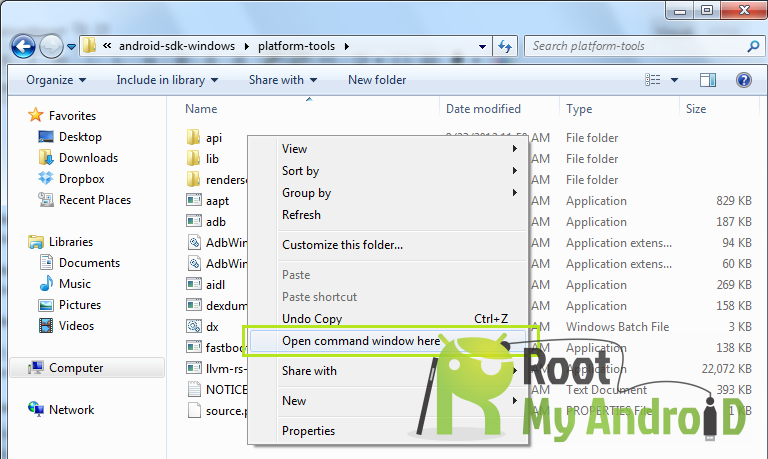
  • You must now open the folder where you installed ADB driver.
  • Now you just have to click right on the screen’s blank area along with hold the shift key and select “OPEN COMMAND WINDOW”.
ABD Command

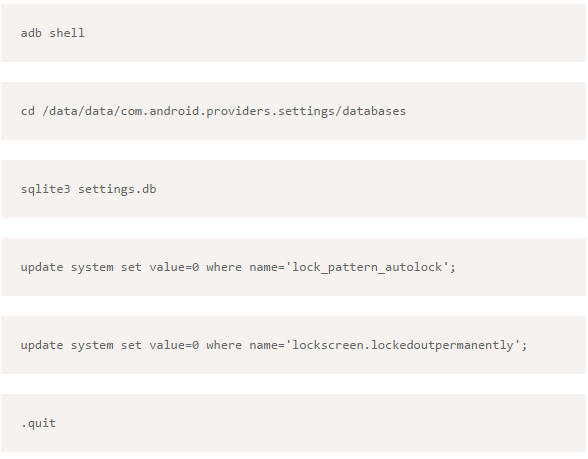
  • A window command will prompt and then you just need to type the following:
cmd Command for pattern unlock
  • Once it has been done then you have to reboot your android device.
  • Now it is all done and set.


After following this guide tutorial now you can access your android device as the pattern lock has been completely disabled.

There is another method to reset the lock pattern on and android device using GMAIL. When you face problem of locked out just click on forgot pattern and follow the basic instructions that follow.

If this guide tutorial really helped you out then please share your experiences with us. And if still any problem persists you can ask for our help and we are there to help you out.

That was it now you can easily unlock any of your friends Phone without even letting him know and making use of it for your propose. But ill not recommend this as the so called friend of yours may punch punch back in your face.

So anything not working with the post or anything you are confused with, just let us know in the comment section below or contact us from the top menu.


Thursday, 1 January 2015

Today many android phone user use the inbuilt unlock pattern to give security to their phones. This is very easy to use but some times after many wrong attempts it locked permanently after that you need to enter the user id you enter in the Google play store to unlock phone but there is some problem to unlock again if u stop data usage in your device so it can’t be connected with internet and then you cannot unlock phone without this trick.

Unlock pattern without Google account:
Android Pattern Lock

In this tutorial will show you how to unlock and reset your android device lock pattern if you have forgotten your lock patter. Just follow these simple steps to unlock your phone and use again free of cost.
  • Just switch off you android phone and then wait for second to switched of it. 
  • Now hold this buttons all together at the same time “Volume up + Home Key + Power Button” until the phone boots (if you device doesn't have a home button just hold together volume up key and power key. 
  • Now a screen like DOS will come up with different options. 
  • Use the volume key to move up and down then scroll down to “Restore Factory Defaults” or “Delete all User Data” depending on which is on your device. 
  • After clicking on the settings above, now scroll down to “Reboot System Now ” and wait for your phone to reboot.
Important:
  • This method deletes all your data and apps. 
  • In step 2 of this method we use three keys Volume up, power and home. But in some phones home is not available so you can press Volume up and down with power button. Here we are not going to tell you all combination of buttons for factory reset. So you can search for your specified android smartphone or tablet.

Unlock pattern using Google account:

  • When you try different patterns and unable to unlock your phone in five attempts. 
  • Then a message pop-up and shows two buttons “next” and “try again”. 
  • Now click on “next” button and you see two options for unlocking phone. One is answer the security question and the second option is to provide Google account details. Mostly people don’t set a security question. But if you set it then simply answer the question and unlock your device quickly. Otherwise check the Google account option and click “next”. 
  • Now provide your Google account username and password attached with your device and click on “sign in”. 
  • After that you are directed to choose new pattern and now you can unlock with this pattern.
After following this guide tutorial now you can access your android device as the pattern lock has been completely disabled. This is all about how to unlock android phone or tablet if you forgot the pattern. Hope this helps you in unlocking your device.