:::: MENU ::::

{d} TryCatch - a well-integrated software service providing Team offering a plethora of services and products like ERP, CRM and other web and mobile apps.

  • Web Designing

    Our designs are browser independant, easily customizable and suitable for all screen sizes

  • Web Development

    {d} TryCatch transforms your business thoughts into reality

  • Mobile App Development

    Managed Mobile Applications along with server side backbone for Business development

  • SEO and SMM

    {d} TryCatch helps you to create your unique visibility and establish Identity

The TryCatch - Now Customize without Compromise.

Sunday, 8 February 2015

Xiomi


Xiaomi India has been embroiled in a legal battle with Ericsson. According to the latest reports, Ericsson has claimed that Xiaomi is violating the Delhi High Court’s order by still selling phones with the MediaTek-based chipsets via a website called www.xiaomishop.com. But Xiaomi’s lawyers have refuted the claim saying that the company has absolutely no stake in the website and in fact some third party is misusing its name.

This issue first surfaced when in early December, a Delhi High Court interim order restrained Xiaomi as well as Flipkart from selling handsets in India as it was infringing on Swedish telecom firm Ericsson’s patents.

The order was passed on the plea of Ericsson that Xiaomi had been violating its eight patents pertaining to AMR, EDGE and 3G technologies in the field of telecommunication. According to SpicyIP, Xiaomi reportedly infringed upon the patents: Standard, Essential Patents (SEPs) which are subject to FRAND (Fair, Reasonable and Non-Discriminatory) terms. It added that these are the same patents on which Ericsson had sued Indian companies such as Micromax, Gionee and Intex. Ericsson having registered patents had all the rights to pull up any company infringing on them.

Ericsson was able to get an ex-parte injunction against Micromax – which means that the other side (here Micromax) did not have chance to presents its case. Ericsson then asked Micromax to produce a huge royalty fee which was to be deposited in the courts.

Ericsson said that it had invited Xiaomi to use its patented technology by obtaining a license, but instead of doing so, the Chinese manufacturer launched its devices in India in July 2014. Ericsson stated that it made attempts for 3 years to get Xiaomi to buy their licenses for products compliant with GSM, EDGE and UMTS/WCDMA.

Xiaomi later announced that it would suspend the sale of its smartphones in India, prompting vice president Hugo Barra in putting out a statement to that effect. At the time, Xiaomi was selling the entry level Redmi 1s at Rs 5,999 and the Redmi Note 3G at Rs 8,999. Around this time, Xiaomi had already received around 150,000 registrations for the next sale of Xiaomi Redmi Note on Flipkart. There was no way out for Xiaomi but to have talks with Ericsson.

Around Dec 16th, the Delhi High Court allowed Xiaomi to sell and import phones based on Qualcomm chipsets only. This would mean, Redmi Note 3G which ran on MediaTek MT6592 SoC, would be debarred from future sales in India.

The court’s order which allows Xiaomi to sell Qualcomm-based handsets still stands and the next hearing is scheduled for March 18th.

This recent claim by Ericsson regarding sale of MediaTek-chipset sporting Xiaomi handsets has been refuted by Xiaomi. According to India head Manu Jain, the online shop www.xiaomishop.com is not authorised by Xiaomi to sell phones anywhere in the world including India. It is not a Xiaomi entity either. In fact, Jain claims that Xiaomi intends to take legal action against the portal as it has continued selling Xiaomi products despite being requested by the company not to do so. By selling Xiaomi products without their express permission, the web portal is also infringing on Xiaomi’s trademarks according to Jain.
Yahoo


Law enforcement cannot indefinitely forbid Yahoo from revealing a grand jury subpoena that seeks subscriber account information, a U.S. judge ruled, because doing so would violate the company’s free speech rights.
US Magistrate Judge Paul Grewal in San Jose, California on Thursday wrote that the government’s request would prohibit Yahoo from disclosing the subpoena, even years after the grand jury concluded its probe. The court order does not disclose the target of the federal investigation.

“In an era of increasing public demand for transparency about the extent of government demands for data from providers like Yahoo, this cannot stand,” Grewal wrote.

Representatives for Yahoo and the U.S. Department of Justice could not immediately be reached for comment on Friday.

Internet companies such as Yahoo, Twitter and Facebook have sought to clarify their relationship with U.S. security agencies and law enforcement, and to challenge secret orders to turn over information, as they seek to re-assure users that they will safeguard their personal information.

In this case, however, the government’s secrecy request was presented directly to the judge outside of the presence of Yahoo lawyers or attorneys for the target of the probe, according to the ruling.

Instead of asking that Yahoo be gagged for 60 or 90 days, the government asked that the company be gagged until further order of the court. The government did not demonstrate why such an indefinite request was necessary, Grewal wrote.

“The government is free to try again to make such a showing,” Grewal wrote. “Alternatively, it may submit a renewed request justifying a finite period.”

Saturday, 7 February 2015

gTalk
Starting February 16, users will have to move away from Google Talk and embrace Hangouts, whether they like it or not. Yes, Google is all set to force users to switch to Hangouts, as it seems to be the future for the search giant.

This isn’t surprising as Google had already made it clear as Gtalk was unavailable for download from Google. Lats year, GTalk was suddenly replaced with Hangouts and most people started finding it very confusing. Users looking to download Gtalk were redirected to Google Hangouts download page.

However, this week, Google has made it quite clear that GTalk will no longer be operational starting Feb 16.Moreover, looks like, Google wants to bind the desktop version to Chrome, forcing users to move to Chrome.Could WhatsApp churning out a web client be the reason for this?

Most users are accustomed to the familiar Gtalk interface, which is also believed to load better than Google Hangout on slow internet connections.

Though Google tried to bring everything – phone calls, sms, messaging and video conferencing – in one place, it hasn’t worked. Hangouts isn’t as popular as WhatsApp, WeChat or some other messaging apps. 

Tuesday, 27 January 2015

Youtube HTML5


Four years ago, we wrote about YouTube’s early support for the HTML5 <video> tag and how it performed compared to Flash. At the time, there were limitations that held it back from becoming our preferred platform for video delivery. Most critically, HTML5 lacked support for Adaptive Bitrate (ABR) that lets us show you more videos with less buffering.

Over the last four years, we’ve worked with browser vendors and the broader community to close those gaps, and now, YouTube uses HTML5 <video> by default in Chrome, IE 11, Safari 8 and in beta versions of Firefox.

The benefits of HTML5 extend beyond web browsers, and it's now also used in smart TVs and other streaming devices. Here are a few key technologies that have enabled this critical step forward:  

MediaSource Extensions

Adaptive Bitrate (ABR) streaming is critical for providing a quality video experience for viewers - allowing us to quickly and seamlessly adjust resolution and bitrate in the face of changing network conditions. ABR has reduced buffering by more than 50 percent globally and as much as 80 percent on heavily-congested networks. MediaSource Extensions also enable live streaming in game consoles like Xbox and PS4, on devices like Chromecast and in web browsers.

VP9 video codec

HTML5 lets you take advantage of the open VP9 codec, which gives you higher quality video resolution with an average bandwidth reduction of 35 percent. These smaller files allow more people to access 4K and HD at 60FPS -- and videos start 15-80 percent faster. We've already served hundreds of billions of VP9 videos, and you can look for more about VP9 in a future post.

Encrypted Media Extensions and Common Encryption

In the past, the choice of delivery platform (Flash, Silverlight, etc) and content protection technology (Access, PlayReady) were tightly linked, as content protection was deeply integrated into the delivery platform and even the file format. Encrypted Media Extensions separate the work of content protection from delivery, enabling content providers like YouTube to use a single HTML5 video player across a wide range of platforms. Combined with Common Encryption, we can support multiple content protection technologies on different platforms with a single set of assets, making YouTube play faster and smoother.

WebRTC

YouTube enables everyone to share their videos with the world, whether uploading pre-recorded videos or broadcasting live. WebRTC allows us to build on the same technology that enables plugin-free Google Hangouts to provide broadcasting tools from within the browser.

Fullscreen

Using the new fullscreen APIs in HTML5, YouTube is able to provide an immersive fullscreen viewing experience (perfect for those 4K videos), all with standard HTML UI.

Moving to <iframe> embeds

Given the progress we've made with HTML5 <video>, we’re now defaulting to the HTML5 player on the web. We're also deprecating the "old style" of Flash <object> embeds and our Flash API. We encourage all embedders to use the <iframe> API, which can intelligently use whichever technology the client supports.

These advancements have benefitted not just YouTube’s community, but the entire industry. Other content providers like Netflix and Vimeo, as well as companies like Microsoft and Apple have embraced HTML5 and been key contributors to its success. By providing an open standard platform, HTML5 has also enabled new classes of devices like Chromebooks and Chromecast. You can support HTML5 by using the <iframe> API everywhere you embed YouTube videos on the web.

Monday, 26 January 2015

Today photographic instruments are evolving at a great speed. The need for remote shutters has been present since a long time. And the remote controllers for the camera are really expensive, and also they do not offer much productivity and ease of control. Plus you need to carry them every time, and everywhere you take your camera. now just imagine a scenario, where you could remotely control the Android device using your smartphone. Here is a short post, by which you could control your DSLR camera using your android smartphone, including changing each and every setting and also taking the final shot.

how to control DSLR using android


In this post we will be using a app on the Play Store, named as DSLR Controller (BETA). This app has been developed by Chainfire, who is the leading android developer, and working on the Root Access. The SuperSU app was also coded by Chainfire. So the app would be well coded, that is for sure. Now this app lets you control your DSLR camera by making a false interface on your android screen as shown in the image. It also feeds you live footage, so you could also monitor when you need to take the shot, even sitting at a distance from the camera. This app could finds it’s appication in many photographic scenarios like, Long Exposure Shots, taking selfies, taking photos on Bulb Mode, Low Light Photography, making videos, and much more. So if you are looking for a way to control your DSRL Camera using Android Device, this app is for you.

Control DSLR from your Android Device:

So follow the steps below to completely control your DSLR from your Android Device, not only click pictures, but also change every setting on the camera remotely using this method.
  • Install this app from the Google Play Store
  • Now after you have installed this app on your phone, connect your Android Device with the DSLR camera using a USB cable.
  • Launch the app, and you will see an interface, where you could manipulate almost every setting of the camera.And remotely click picture, also the app streams the live feed from the camera, so you could see the setting changes and then when you have your required frame, just click using the android device remotely.

Also for further help, you could see this video by the App developer for further info.


So this was a method by which you could control the DSLR camera using an Android Device. If you face any problems in the midst of the procedure, comment below, and we will try to get back to you soon. Also you could hit the App’s customer support. At the moment the app does not support all the DSLR cameras, so if it does not work with yours, may be the developer would provide the support in the coming time.
So you are here because you probably have had set a Pattern lock on your android device, and somehow you forgot the the pattern. So just rather than getting a whole factory reset of your device, we have a very easy and nice tutorial to get your Phone unlocked while not even loosing a single contact out of your Phone.

Bypass android pattern lock


Pattern lock on an android device provides users a great security which further prevents your smartphone with any accidental taps like theft or misuse. If a user wants to use this security feature on their android device then they have to customize it under the settings option in menu.

It happens that sometimes users forget the pattern of lock of their devices and in panic they start guessing the pattern and finally comes with a problem of locked out. Users and dear users don’t panic so much as to every problem there is a definite solution as well. If you face a locked out then you can bypass the pattern lock.

There is very commonly used method to bypass android pattern lock which you have forgotten but that will for sure make you loose all your data and all your contacts and everything. in other words it will make the phone a device the same as your bought with everything wiped off including all applications. This can be done by going into the recovery mode of any android device. and then select factory reset option. This is not recommended as for 2 reasons, first, It will clear all your data, second, we have a better option left with us !

You don’t know how to bypass the pattern lock. No worries at all. We will help you out and you just need to follow some ADB commands and then you can finally bypass the pattern lock on an android device. Just go through the following guide tutorial very carefully step-by-step so as to bypass the pattern lock.


SOME BASIC STEPS BEFORE YOU BEGIN Unlock & ByPass a Pattern Lock on an Android Device Without Loosing Data
  • The very first and important need is the ADB drivers that must be installed in your PC.
  • Then it is really important that the USB debugging must be enabled before your device being locked.
  • You should be very carefull while installing the drivers of your device. This technique will not work without installing the specific drivers.

Users might feel really annoyed and irritated when they tried the pattern lock several times in panic and unfortunately their android smartphone displayed locked out. Further users cannot access their android smartphone and at last need to bypass the pattern lock.


HOW TO BYPASS THE PATTERN LOCK ON AN ANDROID DEVICE

Just Follow the easy tutorial to Unlock an android’s pattern lock without factory reset after when you have forgotten it. And yes its that easy as it sounds.

  • Users need to connect their android device via USB cable to PC.
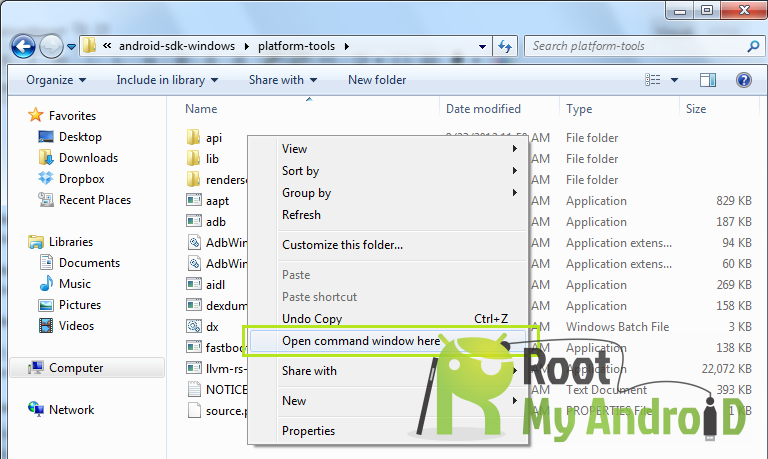
  • You must now open the folder where you installed ADB driver.
  • Now you just have to click right on the screen’s blank area along with hold the shift key and select “OPEN COMMAND WINDOW”.
ABD Command

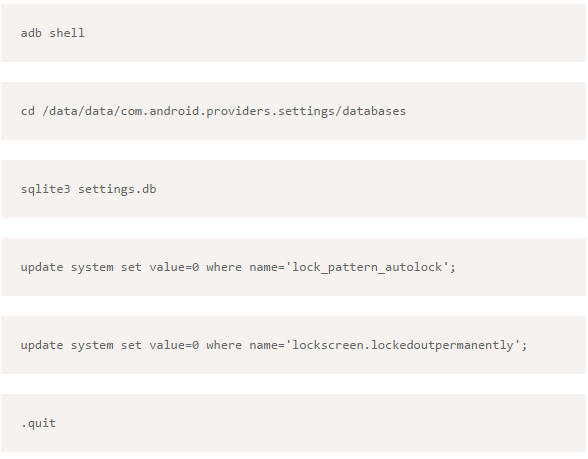
  • A window command will prompt and then you just need to type the following:
cmd Command for pattern unlock
  • Once it has been done then you have to reboot your android device.
  • Now it is all done and set.


After following this guide tutorial now you can access your android device as the pattern lock has been completely disabled.

There is another method to reset the lock pattern on and android device using GMAIL. When you face problem of locked out just click on forgot pattern and follow the basic instructions that follow.

If this guide tutorial really helped you out then please share your experiences with us. And if still any problem persists you can ask for our help and we are there to help you out.

That was it now you can easily unlock any of your friends Phone without even letting him know and making use of it for your propose. But ill not recommend this as the so called friend of yours may punch punch back in your face.

So anything not working with the post or anything you are confused with, just let us know in the comment section below or contact us from the top menu.


Visual Studio and .NET have been two bedrocks of the Microsoft developer ecosystem for over a decade.  With over 1.8 billion installations of .NET and over 7 million downloads of Visual Studio 2013 in just the last year, Visual Studio and .NET are enabling millions of developers to build some of today’s most important software and services powering businesses, apps and sites.

Today, we are taking the next big step for the Microsoft developer platform, opening up access to .NET and Visual Studio to an even broader set of developers by beginning the process of open-sourcing the full .NET server core stack and introducing a new free and fully-featured edition of Visual Studio.  At the same time, we are releasing previews of the next generation of Visual Studio, .NET and Visual Studio Online.

To summarize some of the key news we are announcing today:
  • Over the coming months, we will be open sourcing the full server-side .NET Core stack, from ASP.NET 5 down to the Core Runtime and Framework, and the open source .NET will be expanded to run on Linux and Mac OS X in addition to Windows.
  • Visual Studio Community 2013 is a new, free and fully featured edition of Visual Studio, available today, with access to the full Visual Studio extensibility ecosystem and support for targeting any platform, from devices and desktop to web and cloud services.
  • A preview of the next generation of our tools is available today with Visual Studio 2015 Preview and .NET 2015 Preview.  Together, these bring industry-leading cross-platform mobile development tools, deep support for cloud development, and great productivity improvements across the breadth of the developer experience. 
  • Visual Studio 2013 Update 4 is available now for every Visual Studio 2013 user, including dozens of improvements across the product plus several great new features.
  • Visual Studio Online is expanding its DevOps portfolio with the new Visual Studio Online Release Management service and Visual Studio Cloud Deployment Projects.
For in-depth coverage of these announcements and more, tune in to the Connect(); event coverage on Channel 9 either live or on-demand.

With these releases, we are broadly opening up access to our industry leading platform and tools to every developer building any application in today’s mobile-first, cloud-first world.  No matter if you are a startup, a student, a hobbyist, an open source developer or a commercial developer, and no matter the platform you are targeting or the app you are creating, Visual Studio, Visual Studio Online, .NET and Azure will help you be successful.

.NET Open Source and Cross-Platform

Today, we are beginning the work to make the entire .NET Core server stack open source.  Several key components, like ASP.NET and the C# compiler have been open sourced previously, and today, we are releasing several additional components or the Core .NET framework.  Over the next several months, we will be open sourcing the remainder of the .NET Core Runtime and .NET Core Framework.  These projects will be released under the MIT open source license and we are also issuing an explicit patent promise to clarify users patent rights to .NET. 

Developers can begin engaging with the breadth of .NET open source projects today at http://github.com/Microsoft/dotnet

dotnet corefx


As part of the open source .NET project, we will also be expanding .NET to target Linux and Mac OS X in addition to Windows.  This will provide great new opportunities and flexibility for .NET developers, and enable .NET to be used in many new application scenarios.  We are excited to be working closely with the Mono community on this effort, to jointly deliver an open-source, enterprise-ready .NET implementation for the server to Windows, Linux and OS X.  Miguel de Icaza of the Mono project shares our excitement: “This is a new and exciting time for .NET developers. We are going to blend the best technologies from .NET into Mono, and the cross platform capabilities of Mono into .NET, giving C# developers the best of both worlds."

Visual Studio Community 2013

Great apps require great tools, and today we are opening up access to Visual Studio to an even broader set of developers. 

Visual Studio Community 2013 is a new free, fully-featured edition of Visual Studio that lets developers target any platform, from desktop and mobile to web and cloud.  Visual Studio Community 2013 also supports full Visual Studio extensibility, offering access to the ecosystem of over 5000 extensions.

In addition to broad platform support in a unified Visual Studio experience, Visual Studio Community 2013 also includes dozens of great Visual Studio tools, including Peek, Blend, Code Analysis, Graphical Debugging and full C# refactoring.

Support for Visual Studio extensibility means developers gain access to tools for a wide variety of technologies and platforms supported by the rich Visual Studio extensibility ecosystem, including the Visual Studio Gallery.   For example, Visual Studio Community users have access to the excellent Visual Studio Tools for Unity and the open source Node.js Tools for Visual Studio and Web Essentials for Visual Studio.

Opening up access to Visual Studio extensibility to a wider audience also creates great new opportunities for extension authors to build new tools and experiences on top of the Visual Studio platform.  For both open source and commercial extension authors, Visual Studio offers a great developer tools platform.

Visual Studiao Community


And most importantly, Visual Studio Community 2013 is free for any non-enterprise application development.

Developers can now use the breadth Microsoft’s tools and services for free with Visual Studio Community 2013 tools for developing applications from mobile and desktop to web and cloud, Azure Free Trial providing hosting for 10 websites + 10 mobile services, and Visual Studio Online offering developer services free for up to 5 users.  You can get started with all three offers today.

Visual Studio Free

Visual Studio 2015 Preview and .NET 2015 Preview

The next generation of Visual Studio and .NET brings substantial improvements in core developer productivity, as well as new support for cross-platform mobile development and cloud-based development.  You can download Visual Studio 2015 and .NET 2015 previews now.

Productivity

The C# and VB code editing experiences get even better in Visual Studio 2015 with built-in integration of the new “Roslyn” .NET compiler platform.  New language features in C# 6 reduce boilerplate and clutter in everyday code, and the new light bulbs in the editor bring proactive refactoring and code fix opportunities to your attention as you are writing or browsing code. 

Visual Studio Debugger


Visual Studio 2015 continues to improve on core debugging and profiling experiences, with support for breakpoint configuration and PerfTips, both available directly in context in the editor as well as support for debugging lambda expressions.

Visual Studio Debugger


We’ve also added the Smart Unit Tests feature to Visual Studio 2015.  Based on the Pex technology developed by Microsoft Research, Smart Unit Tests analyses code and automatically generates unit tests to describe its behavior.

Desktop development continues to be important for many Visual Studio and .NET developers.  As part of .NET 2015 we will deliver .NET 4.6, the next update to the desktop .NET framework.  This release will include a few key improvements to the WPF platform, including support for transparent windows and multi-image cursor files.  In addition, Visual Studio 2015 Preview adds new tools for WPF development, including a Visual Diagnostics tool, a Timeline tool, and a re-designed Blend designer experience.  We’ve published a new roadmap for WPF with additional details.

Cloud

Visual Studio 2015 is the most deeply cloud-aware IDE we’ve ever built, from Azure and Visual Studio Online integration, to cloud application development.

.NET 2015 includes ASP.NET 5, a new, lean and composable framework for building web and cloud applications.  ASP.NET 5 is cross-platform and open source, and apps can run side-by-side with different versions of the framework on the same server. 

ASP.NET 5 also brings a new developer experience built upon on-demand compilation, enabling a faster edit-debug cycle, and support for any code editor.  Visual Studio 2015 includes all the familiar ASP.NET MVC tooling experiences for ASP.NET 5. 

Visual Studio 2015


Visual Studio 2015 also includes the Add Connected Service dialog, making it easy to discover and consume REST APIs in your applications, including services from both Microsoft and 3rdparties, with support for Azure Mobile Services, Azure Storage, Office 365 and Salesforce today.  In addition, you can also add AD authentication to your web apps using the Azure Active Directory Authentication wizard.

Developers integrating with the rich data and services in Office 365 can build upon the new Office 365 APIs which are generally available now and can get started using the API sandbox or today’s release of new Office Developer Tools for Visual Studio. 

Also available today is the Azure SDK 2.5, with further improvements to cloud diagnostics and remote debugging support for Azure VM and Cloud Services.

Cross-Platform Mobile Development

As developers continue to increase their focus on targeting the mobile device platform spanning iOS, Android and Windows, the need for cross-platform mobile development solutions has never been greater.

On top of great tools for building Universal Windows Applications, Visual Studio 2015 offers the most complete cross-platform mobile application development environment, with great solutions for C#, C++ and HTML/JavaScript development targeting iOS, Android, Windows and more. 

C# and Xamarin

The Xamarin Platform enables developers to build native applications within Visual Studio for every device using the productivity of .NET while leveraging all the power of the device. We continue to partner with Xamarin to enable a great experience for C# and F# developers doing cross-platform mobile development.

Today we are expanding this collaboration in three key ways:
  • We are jointly providing a discount to eligible MSDN subscribers for Xamarin Business or Enterprise.
  • We are increasing the integration between Visual Studio and Xamarin, with a streamlined experience for installing Xamarin from Visual Studio.
  • Xamarin will add Visual Studio support to its free offering Xamarin Starter Edition later this year. This complements the release of Visual Studio Community, opening up .NET cross-platform mobile development to any developer.
xamarin


C++


C++ continues to be a leading choice for high-performance applications and the richest possible experiences across the industry.  For mobile developers, C++ is a key part of game development and high performance shared code libraries across multiple platforms, an increasingly important component of today’s richest mobile applications.


With Visual Studio 2015, we are delivering a complete tool chain for cross-platform mobile development with C++.  This includes integrated support for the Clang complier and LLVM optimizer for targeting Android now and iOS soon.  You can edit and debug a single set of C++ source code, and build it for iOS, Android and Windows.

Visual Studio 2015 also brings dozens of additional productivity features for C++ developers, including new refactorings, improved “Find in Files” and improved incremental builds.  At the same time, the Visual C++ compiler includes more complete C++ 11 and C++ 14 support.
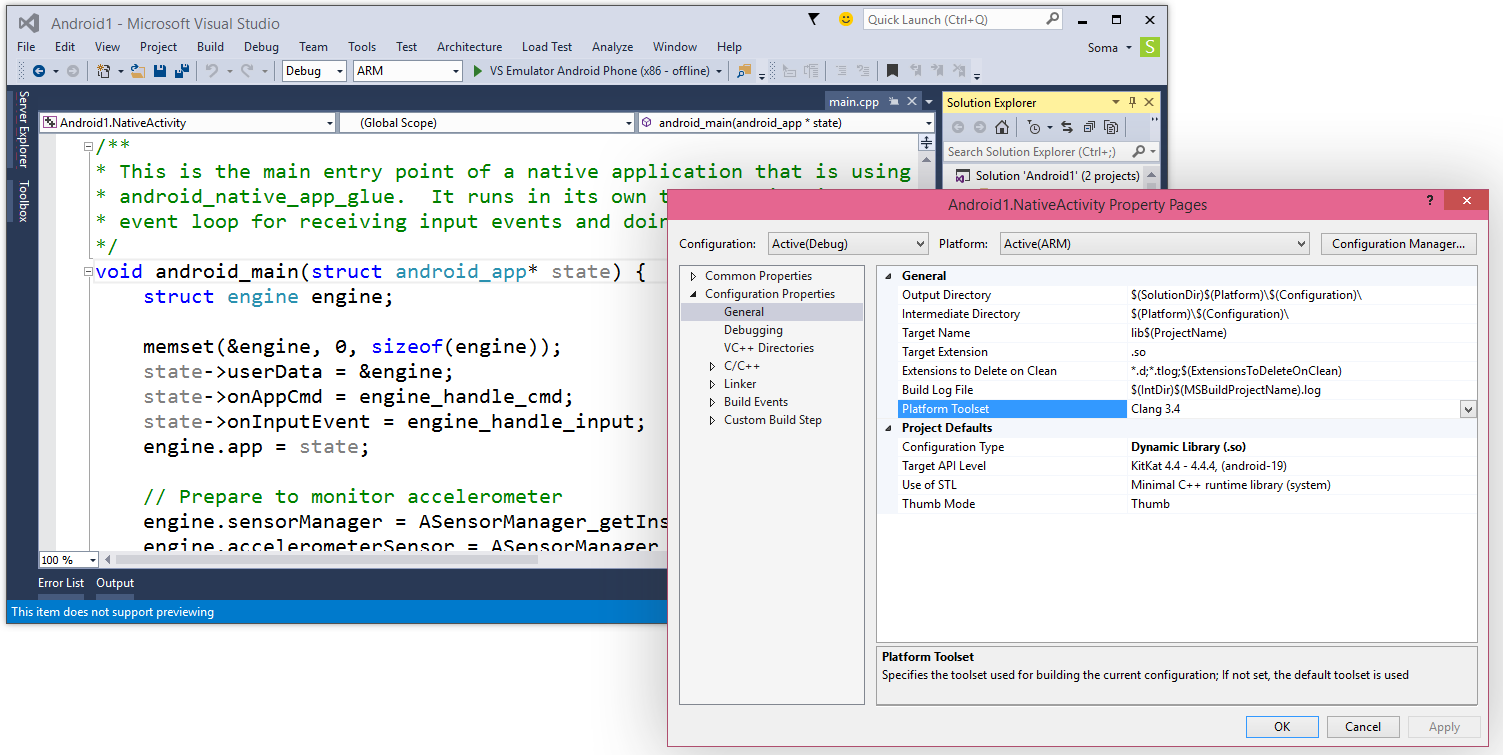
C# android

HTML/JavaScript and Apache Cordova

On mobile devices HTML5 and JavaScript are expanding from rich mobile-optimized web experiences to increasingly being used as part of packaged mobile applications.  Visual Studio 2015 includes built-in support building applications for the open source Apache Cordova platform targeting iOS, Android and Windows. 

The Visual Studio support for Cordova provides tools for authoring, debugging, analyzing, packaging, and deploying Cordova applications, all within the familiar Visual Studio IDE. 

The newest release of the Visual Studio Tools for Cordova includes support for Windows 8.1/Universal apps, iOS debugging from within Visual Studio, and seamless integration with TypeScript, providing a highly productive application authoring experience.

js cordova ios

Visual Studio Emulator for Android

As developers target multiple mobile device form factors, great emulators are key to productive development cycles.  As part of Visual Studio 2015, developers now also get access to the Visual Studio Emulator for Android, a high-performance x86-based emulator for the Android platform that supports a variety of productivity features for emulating device inputs like accelerometer, location, and network conditions. 
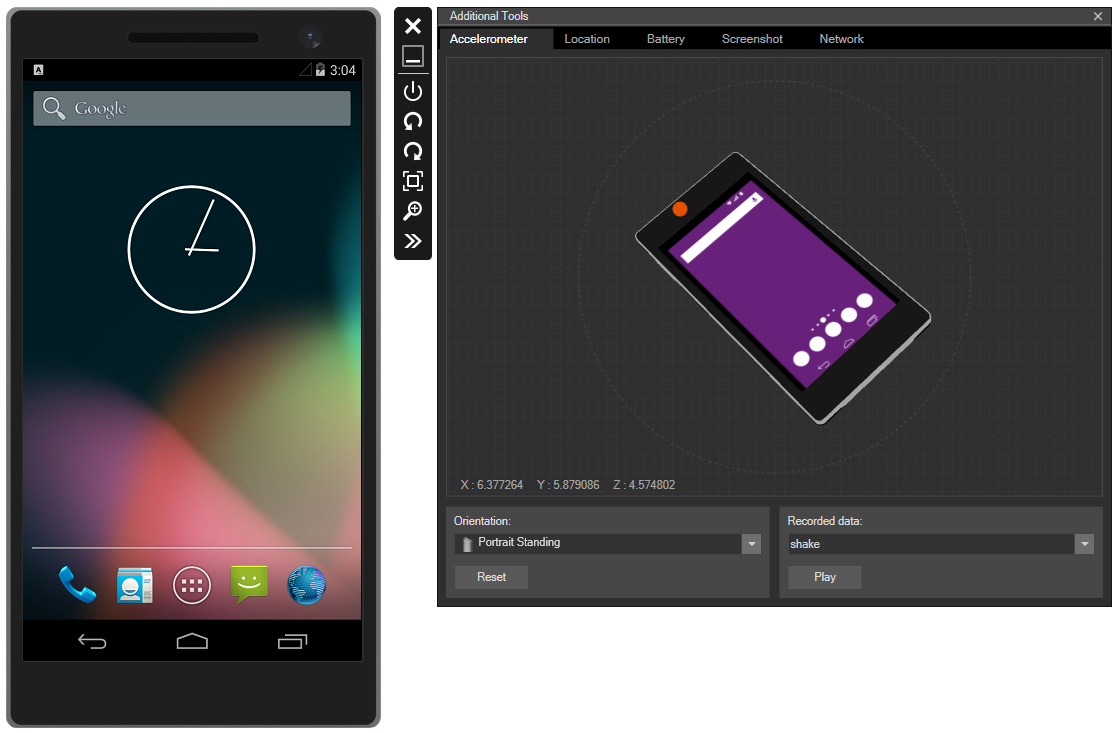
visual sudio android emultaor

Visual Studio 2013 Update 4

In parallel with development of Visual Studio 2015, we’ve also been delivering regular updates to Visual Studio 2013.  Today, Visual Studio 2013 Update 4 is available for all Visual Studio 2013 users, including dozens of improvements as well as several new features, including full integration of the Unity Tools for Visual Studio, enabling developers to use the Visual Studio IDE for Unity application development.

DevOps in Visual Studio and Visual Studio Online

The integration of Dev and Ops continues to enable new agility in the end-to-end application development process.  Visual Studio Online, TFS, Azure and Visual Studio are bringing a collection of integrated tools to help organizations embrace DevOps practices.

Cloud Deployment Projects enable environment configuration to be captured as code and managed along with cloud projects and solutions in Visual Studio.  Cloud Deployment Projects is part of the Azure SDK 2.5 tools for Visual Studio which is available today.

Release Management for Visual Studio is now available as a Visual Studio Online service preview. Release Management helps organizations to easily orchestrate deployments of source and configuration artifacts across their dev/test/production pipelines.  This enables teams to release more frequently, with higher confidence.
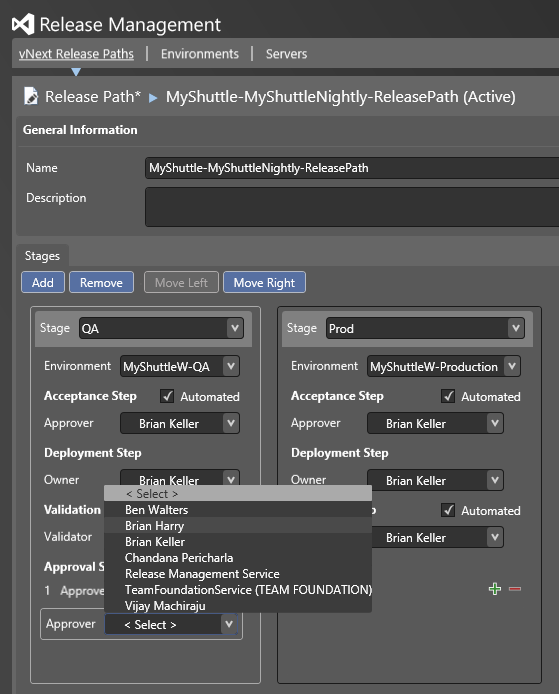
devOps

Summary

Today, we had the opportunity to share our vision for the Microsoft developer platform.  As part of that vision, we aspire to enable every developer and any application to have access to Visual Studio, .NET, Azure and Visual Studio Online

No matter whether you are a startup, a student, a hobbyist, an open source developer or a commercial developer, and no matter the platform you are targeting or the app you are creating, Visual Studio, Visual Studio Online, .NET and Azure will enable you to build for the breadth of today’s mobile, desktop, web and cloud platforms.